On this page
- Why do enquiries stop, and in what order?
- Stage 1: Is my page found at all?
- Stage 2: Why is my page shown but not clicked?
- Stage 3: Why do visitors not trust my page?
- Stage 4: Is it easy to contact me?
- Stage 5: What happens after an enquiry arrives?
- Which symptom points to which fix?
- How do I measure each stage?
- What should I not do?
- Frequently asked questions
A website gets no enquiries because one of five things is broken, and they break in a fixed order: people can’t find it, they find it but don’t click, they click but don’t trust it, they trust it but can’t easily contact you, or they do contact you and the enquiry is lost afterwards.
The fix for each is different, so the first job is to find which stage is failing, not to change everything at once.
This guide gives you a triage you can run in an afternoon with free tools. Work down the stages in order. If stage 1 is broken, nothing after it matters yet.
These numbers set the scene. Many pages are never found, clicks are hard to earn, and many sites miss Google’s speed and stability targets. Each is a reason to diagnose before you spend. Each also has limits, noted where it appears below.
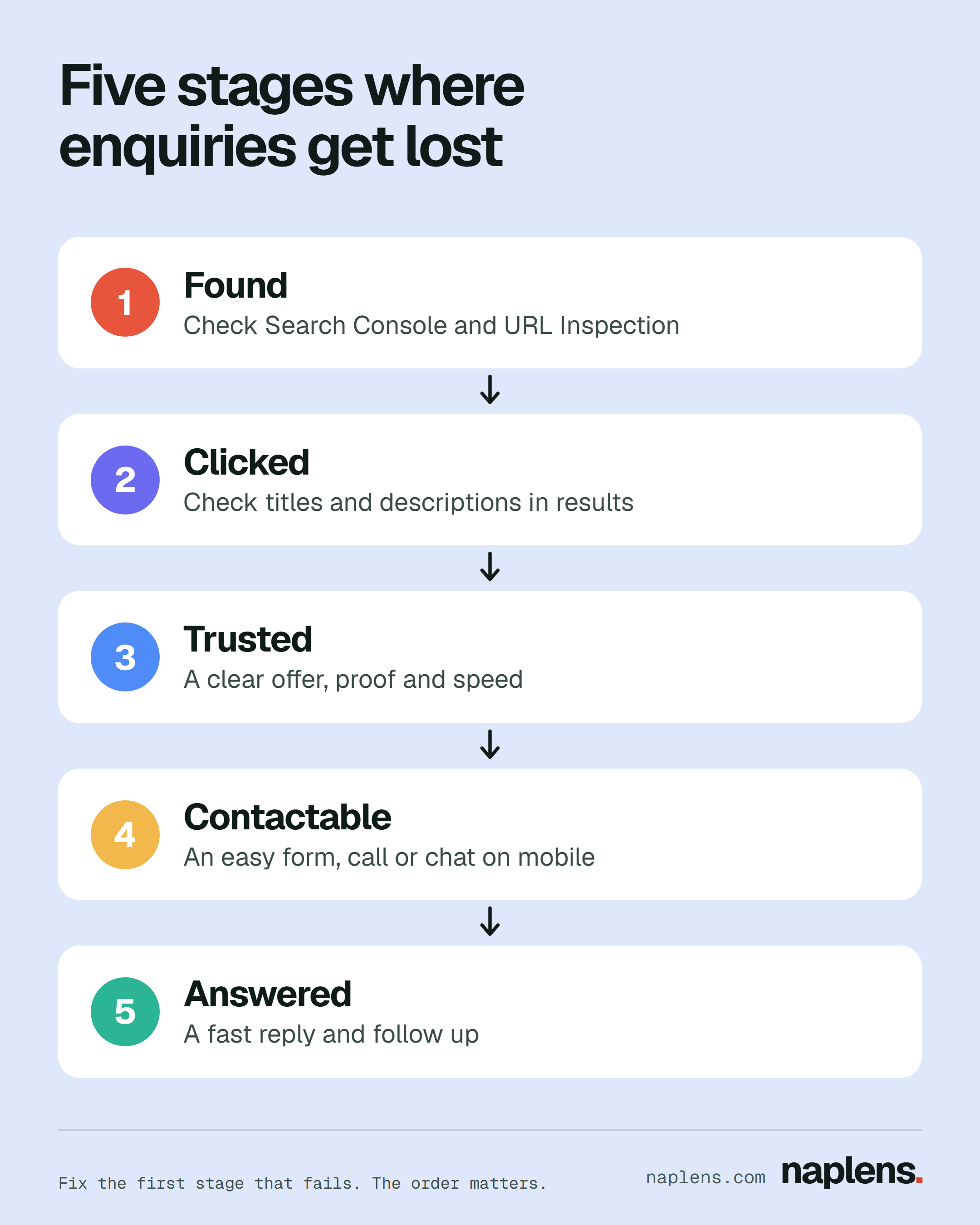
Why do enquiries stop, and in what order?
An enquiry is the last step of a chain. Picture a leaky pipe: you only learn where the leak is by checking each joint from the tap onwards.
- Found: Google has the page and can show it.
- Clicked: the result looks relevant enough to choose.
- Trusted: the page makes the offer clear and believable.
- Contactable: there is an easy next step.
- Answered: the enquiry is replied to quickly and followed up.
Two honest limits. First, a new site can take time to be found, and nobody can promise how long. Second, a low number of enquiries can be normal for a business that sells rarely, such as a surveyor or a wedding venue.
Compare against what you would reasonably expect, not against a number from the internet.
What this means for you: Write down roughly how many enquiries you expect each month, so you can tell a real problem from a slow business.
Stage 1: Is my page found at all?
Google’s own tool for this is the URL Inspection tool in Search Console, which is free. It shows what Google has in its index for a specific page.
“URL is on Google” means the page is indexed and eligible to appear, though that is not a guarantee it will show up.
“URL is not on Google” means it can’t appear, and the Page indexing section explains why (Google Search Console Help, URL Inspection tool).
What to check:
- Verify your site in Google Search Console. Without it you are guessing.
- Inspect your home page and your main service page. Look for “URL is on Google”.
- Run a live test if it says the page isn’t indexed. A result of “URL is available to Google” means the page isn’t blocked and has no detectable errors that would stop indexing. The live test doesn’t check manual actions, quality guidelines or duplicate status.
- Try a quick search for
site:yourdomain.com. This is a rough check only. Google’s documentation does not describe it as a complete list, so treat it as a hint and use Search Console as the real answer. - Look for accidental blocks: a
noindexrule left on after the site was built, or a robots.txt file blocking crawling. Google explains that anoindexrule is how you keep a page out of the index (Google Search Central, title link documentation), so check that it isn’t on pages you want found. - Submit a sitemap. For many new or updated pages, Google’s help page recommends this over repeatedly requesting indexing. Requesting indexing is not guaranteed to work and has a daily limit. Google’s SEO starter guide also says changes can take effect in a few hours or take several months, and suggests waiting a few weeks before judging whether your work helped.
Even when a page is indexed, being indexed is not the same as ranking.
If you are indexed but rarely seen, that is a visibility problem, covered in our guide to whether SEO is worth it for a small business.
For scale, a December 2023 Ahrefs study of about 14 billion pages found 96.55% got no organic traffic from Google.
Ahrefs says its sample is biased toward the quality side of the web and its traffic figures are estimates, so read it as a sign that being found is not automatic, not as an exact rate.
What this means for you: Open Search Console today, inspect your home page and main service page, and note whether each says it is on Google.
Stage 2: Why is my page shown but not clicked?
Open the Performance report in Search Console. It shows impressions (how many times your site appeared in results), clicks, click through rate (clicks divided by impressions) and average position (Search Console Help).
Look at pages with plenty of impressions and few clicks. Those are being shown and ignored.
Clicks are not guaranteed even when you are shown.
In a 2025 Pew Research Center study of 900 US adults, using browsing data from March 2025, people clicked a regular result link in 8% of visits to Google searches that showed an AI summary, against 15% of visits without one (Pew Research Center, July 2025).
This is confirmed for US users and Google only. How it applies in your country is not known.
- Without an AI summary15% of visits
- With an AI summary8% of visits
Source: Pew Research Center, 900 US adults, March 2025 browsing data
A clear, specific result matters more, not less.
Fixed price quotes in 3 days, 20 years of fitted kitchens, local references on request. Illustration only.
The example above is an illustration of a specific result, not real data.
What to change:
- The title. Google says to give every page a distinct, descriptive, concise title and to avoid vague labels like “Home”. Google may also rewrite your title from other sources on the page, including headings, so make your main heading clear too (Google Search Central).
- The description. Google doesn’t always use your meta description, but when it does, a good one summarises the page, is unique, is specific, and includes key facts such as price or location (Google Search Central, snippets).
- What you promise. A title that names the service and the place or audience (“Kitchen fitting for small homes in Leeds”) is clearer than a business name alone. This example is illustrative, not tested.
If you have almost no impressions, you are back at stage 1, or you are not ranking for anything people search. Changing titles won’t fix that.
What this means for you: Find one page with many impressions and few clicks in Search Console, and rewrite its title to name the service and who it is for.
Stage 3: Why do visitors not trust my page?
This is a likely leak for sites that are indexed and visited but get no action. Check these four things yourself, then check them again on a phone.
- Clarity of the offer. In five seconds, can a stranger say what you sell, who it is for and where? Ask someone outside your business to look at your home page for five seconds, then tell you what you do.
- Proof. Real customer reviews with names or sources, photos of your own work, certifications you actually hold, a real address and real people on an About page. Do not invent or inflate any of it.
- Design and tidiness. Broken images, tiny text, clashing pop ups and outdated content can all lower confidence.
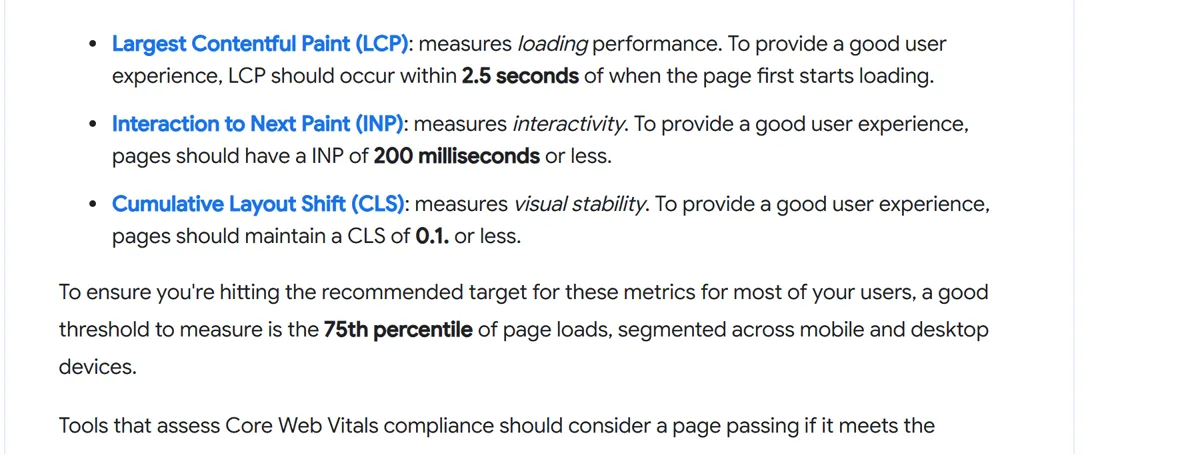
- Speed and stability. Google’s web.dev documents three Core Web Vitals, measured at the 75th percentile of page loads: loading (Largest Contentful Paint, 2.5 seconds or less is good), responsiveness (Interaction to Next Paint, 200 milliseconds or less) and visual stability (Cumulative Layout Shift, 0.1 or less) (web.dev). Test your page for free with PageSpeed Insights.
Good 2.5 s or less
Poor Over 4 s
Good 200 ms or less
Poor Over 500 ms
Good 0.1 or less
Poor Over 0.25
You are not alone if you miss them. The HTTP Archive Web Almanac, using July 2025 data, reports that 48% of mobile websites and 56% of desktop websites passed all three.
These are shares of websites, so they are a benchmark, not a verdict on your site.
- Good loading (LCP)62% of mobile websites
- Good responsiveness (INP)77% of mobile websites
- Good visual stability (CLS)81% of mobile websites
- Passed all three48% of mobile websites
Source: HTTP Archive Web Almanac 2025, July 2025 data
Speed is linked to business results in some case studies, but those come from the companies themselves. web.dev reports that Vodafone saw an 8% sales increase after a 31% improvement in Largest Contentful Paint, with no date given.
That is reported by the company, not independent proof it will work for you.
What this means for you: Run your home page through PageSpeed Insights on mobile, and ask one outsider what your business does after five seconds.
Stage 4: Is it easy to contact me?
Many sites lose people here without noticing. Do this test: pick up your phone, open your site on mobile data, and try to enquire as if you were a customer.
- Is a contact method visible without scrolling or opening a menu?
- Does the phone number tap to call? Does the WhatsApp button open a chat?
- Is the form short? Name, a contact detail and a message is usually enough. Every extra required field is a reason to stop.
- Does the form actually send, and do you receive it? Submit a test every month.
- Is there a clear next step on every service page, not only on the contact page?
- If you take bookings, does the calendar link work on a phone?
Offer more than one route, because customers differ. Some will call, some will message, some will fill a form. Whichever you offer, make sure someone watches it.
What this means for you: Submit your own form from a phone this week, and confirm the message arrives where someone will read it.
Stage 5: What happens after an enquiry arrives?
A site can be working and still look broken because replies are slow or follow up never happens. Check your inbox, form notifications and messages for the last month. Count how many arrived, how many got a reply, and how long that took.
If a form notification goes to an address nobody reads, that is a stage 5 failure that looks like a stage 4 one.
Fixes in order of effort: a shared inbox that more than one person sees, an automatic acknowledgement (“Thanks, we reply within one working day”), and a simple follow up reminder after a few days.
For deciding what to automate and what to keep human, see AI automation: what to automate first.
No verified study on reply speed is cited here, so this advice rests on common sense, not a number.
What this means for you: Count last month’s enquiries and replies, then set up an automatic acknowledgement so nobody waits in silence.
Which symptom points to which fix?
| What you see | Likely stage and cause | First fix |
|---|---|---|
| Search Console says “URL is not on Google” | Stage 1: blocked, not crawled or errors | Read the Page indexing reason, remove any noindex, submit a sitemap |
| Few impressions for any search | Stage 1 or visibility: not ranking for what customers search | Check indexing, then see whether pages match real questions |
| Many impressions, few clicks | Stage 2: weak title or description | Rewrite titles and descriptions to be specific |
| Visits but nobody scrolls or clicks | Stage 3: unclear offer or low trust | Clarify the headline, add real proof |
| Slow, jumpy pages on phones | Stage 3: Core Web Vitals | Run PageSpeed Insights, fix the largest items first |
| Visits to the contact page, no form sends | Stage 4: form is long, broken or hard to find | Shorten it, test it, add tap to call and chat |
| Enquiries arrive but few customers | Stage 5: slow reply or no follow up | Reply quickly, acknowledge automatically, follow up |
How do I measure each stage?
This is general guidance, not a setup for your exact site. Check the current help pages because menus change.
| Stage | Where to look | What to look at |
|---|---|---|
| 1 Found | Search Console, URL Inspection and Page indexing | Is each key page indexed |
| 2 Clicked | Search Console, Performance | Impressions, clicks, click through rate by page |
| 3 Trusted | GA4 and PageSpeed Insights | Pages with visits and little action, Core Web Vitals |
| 4 Contactable | GA4 events | Clicks on phone, chat and form submissions |
| 5 Answered | Your own inbox or CRM | Reply time and follow up count |
In GA4, Google defines a key event as one that measures an action particularly important to your business, and any collected event can be marked as one (Google Analytics Help).
Enhanced measurement can collect form interactions (form_start and form_submit), outbound link clicks and file downloads (Google Analytics Help).
For lead forms, Google lists generate_lead as a recommended event, which you must send yourself, and you can check it in DebugView (Google Analytics Help).
Whether the automatic form events fire correctly depends on how your form is built, so test them before you trust the numbers.
What this means for you: Mark one action, such as a form submission, as a key event, and check it fires with a test.
What should I not do?
- Don’t buy traffic to a page that doesn’t convert. Paid visitors meet the same stage 3 and 4 problems, and you pay for each one. Fix the page first, then compare options in SEO vs Google Ads vs Meta Ads.
- Don’t change everything at once. You won’t know what worked. Change one stage, wait, then look.
- Don’t judge on a few days of data. Small sites have small numbers, so look at weeks, not days.
- Don’t copy a competitor’s page. Their proof isn’t yours.
- Don’t trust anyone who promises rankings. Nobody outside Google can.
Frequently asked questions
Why is my website not getting traffic?
Usually because it isn’t indexed, or it is indexed but doesn’t match what people search for. Start with URL Inspection in Search Console. If pages are indexed, check the Performance report for impressions.
Why is my website not showing up on Google?
Check whether the page is indexed with URL Inspection, and look for a noindex rule or a robots.txt block. New sites can also simply take time, and Google says a request for indexing is not guaranteed to succeed.
Why is my website not ranking on Google?
Being indexed only makes a page eligible to appear. Ranking depends on relevance, quality and competition, and no one can promise a position.
Our guides on whether you still need a website and whether SEO is worth it cover the wider picture.
Why is my website not converting?
If people visit but don’t act, the problem is usually at stage 3 or 4: an unclear offer, little proof, slow pages or a hard to find contact route. Test it on a phone as if you were a customer.
How do I get more enquiries from my website?
Fix the first failing stage in this checklist, then measure the next. Make the offer clear, add real proof, offer two or three easy contact routes and reply fast.
If you would rather have someone run this diagnosis and rebuild the weak stages with you, our website design service can help. There is no need to rush into it, and the checklist above works on its own.

Written byPriscilla Owusu MensahCMO, Naplens DigitalLeads marketing at Naplens Digital and runs its AI automation and content and ads work. Came to digital from nursing and has trained more than 300 aspiring marketers.