On this page
- Why do people say a small business does not need a website?
- What can each channel do, and what can it not do?
- Should you rent your audience or own it?
- So, do you need a website? A decision table
- What must a website do to be worth having?
- What is the minimum viable website checklist?
- What mistakes do small business websites make?
- Who should not rush to build a website?
- Frequently asked questions
Most small businesses do still need a website, but not every business needs one on day one, and a website that does nothing is no better than none.
If customers have to trust you, compare you, book you, pay you or find you when you are not posting, a website is the one place that you fully control.
If you sell one simple thing to people who already know you, a social page and a Google profile can carry you for a while.
The honest answer depends on how customers find you, what they need before they buy, and how much risk you can accept from relying on platforms you do not own.
This guide gives you a fair look at each channel, a decision table, and a checklist for the smallest website that is worth having.
Why do people say a small business does not need a website?
People type questions like “do small businesses need a website”, “do I need a website for my business” and “can I run a business without a website” into Google. The objection behind them is reasonable. A free Instagram page takes an hour.
A Google profile takes a short verification. A marketplace gives you a shop and buyers on the same day. Why pay for more?
Because each of those tools does a narrower job than it first appears. Let us look at what each one can and cannot do.
What this means for you: Before you decide, write down where your last ten customers first heard of you.
What can each channel do, and what can it not do?
Can a social media page replace a website?
Social pages are good at reaching people who already use the app and at showing that a business is alive. Reach is large.
Pew Research Center’s 2025 survey of 5,022 US adults (fielded February to June 2025) found that 84% use YouTube, 71% use Facebook and 50% use Instagram. That survey covers the United States only, so your own market may look different.
You can read it on the Pew Research Center site.
- YouTube84% of US adults
- Facebook71% of US adults
- Instagram50% of US adults
Source: Pew Research Center, 5,022 US adults, February to June 2025
What a social page cannot do well is act as a stable reference. Posts are pushed down by newer ones. The platform decides who sees them. And the platform can remove content or even disable an account.
Meta’s Terms of Service say it can “remove or restrict access to content” that breaks its rules and can “suspend or disable your account” in cases of clear, serious or repeated breaches. Most owners never face this.
If it happens, though, your customer list and your history sit inside an account you no longer control.
What does a Google Business Profile do, and does it need a website?
A Business Profile is a Google listing that controls how your business appears in Google Search and Maps. Google’s help pages describe it as showing details such as address, hours and category, and say it can help your local ranking.
Two facts matter here. First, a profile is only for businesses that meet Google’s rules.
Google’s eligibility guidelines say a business must “make in person contact with customers during its stated hours”, and they list “brands, organizations, artists, and other online only businesses” as ineligible.
So if you sell only online, a Business Profile is not an option, and a website matters even more.
Second, Google presents adding a website as a choice. Its help page on contact info says you “can share your business’s website with your customers”, and nothing on the pages reviewed says a website is required.
But the eligibility guidelines also say the website on a profile should be the “single, authoritative” website for the business and must be owned and managed by the owner.
A profile is a strong front door, but it is a short summary, not your full story.
Are marketplaces and booking platforms enough?
Marketplaces such as large online shops, delivery apps and booking directories bring buyers who are already ready to purchase. For many small sellers, that is worth a lot.
The trade is that the platform sets its own rules, its own search results and its own presentation, and your listing sits next to your competitors’.
Fees and terms differ by platform and country and change often, so this guide does not compare them. Read the terms of any platform before you depend on it.
Do AI assistants and AI search need my website?
AI tools now answer questions with summaries, and the summaries change how people click.
In a Pew Research Center analysis published in July 2025, which tracked the browsing of 900 US adults across 68,879 Google searches in March 2025, users clicked a regular result in 8% of visits when an AI summary appeared and 15% when it did not.
Only about 1% of visits included a click on a link inside the summary. This is one US sample of Google use, so treat it as a signal, not a rule for every country.
- Page with an AI summary8% of visits
- Page without an AI summary15% of visits
Source: Pew Research Center, July 2025, 900 US adults
Google’s guidance on AI features in Search says that to appear as a supporting link in AI Overviews or AI Mode, a page must be “indexed and eligible to be shown in Google Search with a snippet”.
It also says there are “no additional requirements” and no special schema or AI file needed. You can read the full guidance on Google Search Central.
Read that plainly. These features show links to pages. If you have no website, there is no page of yours to link.
A profile or social post can still be seen in search, but your own site is the page you can shape so that the facts are right, the answer comes first and the page is easy to quote.
Nobody can guarantee that an AI tool will mention you, and the systems change. For more on this, see AEO and GEO explained and how businesses show up in ChatGPT.
What this means for you: Pick the one channel that brings most enquiries today and check that it links to a website you control.
Should you rent your audience or own it?
Marketing people split channels into two groups.
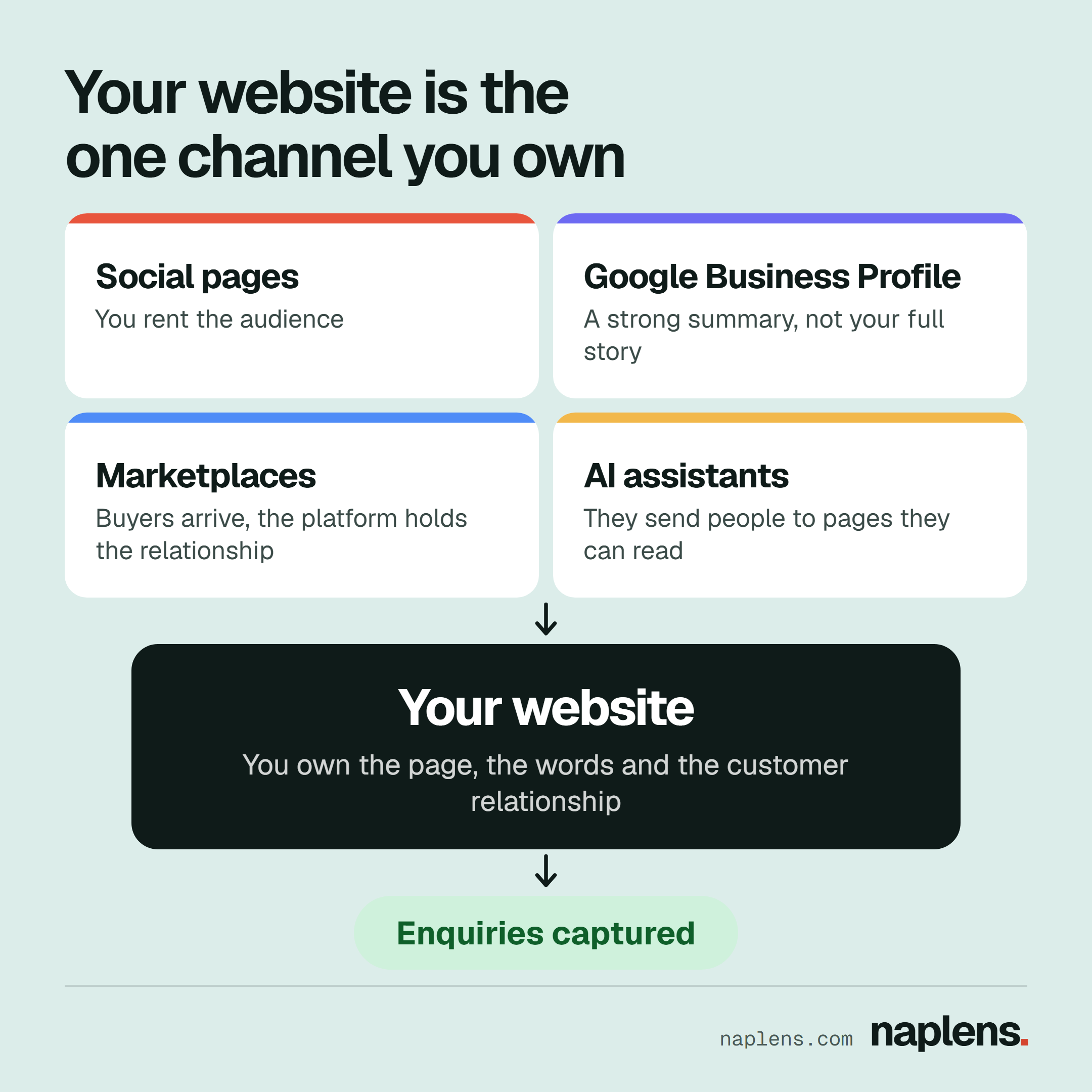
- Rented: social pages, marketplaces and directories. Someone else owns the audience, the rules and the data. You get access while the arrangement lasts.
- Owned: your website, your domain name and your email list. You decide what is published, how it looks, what you ask for and what you measure.
Rented channels are not bad. They are often the cheapest way to start. The risk is dependence. If all your enquiries come from one app and its reach, rules or your account status change, you have no second route.
A website with a contact path and, ideally, an email sign up gives you that second route.
There is also a trust step that happens after someone finds you.
BrightLocal’s Local Consumer Review Survey 2026, which asked 1,002 US adults, found that 54% visit a business’s website after reading positive reviews.
People find you on a platform, then check you on your own site. If there is nothing to check, some of them stop there. That figure is for US consumers, so test it against your own customers.
What this means for you: Add an email sign up and a clear contact path to your site, so you have a route no platform can switch off.
So, do you need a website? A decision table
This table is a judgment framework based on how customers usually decide. It is not survey data, and your situation may differ.
| Business type | Website | Why | What it must do first |
|---|---|---|---|
| Local shop or restaurant with walk in trade | Strongly advised | Customers check hours, menu and location before they come | Show address, hours, map, phone, menu or price list |
| Trades and home services (plumber, electrician, cleaner) | Essential | People compare several providers and want proof before inviting someone in | Service list, areas covered, reviews, quote request form |
| Professional services (law, accounting, consulting, clinics) | Essential | Trust and credentials decide the enquiry | Who you are, qualifications, services, how to book |
| Online seller | Essential | You cannot have a Business Profile, and you need a place to own the customer | Product pages, clear delivery and returns, safe checkout |
| Creator, freelancer or photographer | Essential | Your portfolio is your sales page | Best work, rates or how to ask, contact form |
| Home business selling to friends and neighbours | Optional for now | Word of mouth and a social page may be enough while volume is small | A pinned post with prices, contact and ordering steps |
| Market stall or one off seller | Optional | Low spend per customer, repeat local customers | A phone number and a social page you keep tidy |
| Business with a price above what a customer will decide on quickly | Essential | Bigger decisions need evidence | Case examples, process, guarantees you can honestly stand behind |
If you are in the “optional” rows, a website becomes worth it when you notice that customers keep asking the same questions, when you want to be found by strangers, or when one platform provides most of your enquiries.
- 1Do customers ask you the same questions?If yes, a page can answer them once
- 2Do you sell only online, or need strangers to find you?If yes, you need a site
- 3Does one platform bring most enquiries?If yes, you need a second route
- 4Can you keep a site accurate?If not yet, tidy your social page first
What this means for you: Find your business type in the table and decide whether your row says essential, advised or optional.
What must a website do to be worth having?
A website only pays off if it does a job. Those jobs are:
- Tell people what you do, for whom and where, in the first screen.
- Prove you are real. Names, photos of real work, reviews, an address or service area, and how long you have operated.
- Make contact easy. One obvious next step: call, message, book or buy.
- Answer the questions that stop people buying. Prices or price ranges, timing, process, returns.
- Be findable. Pages Google can crawl, with clear titles and headings.
Google’s guidance on helpful content says to ask whether your page would serve visitors who arrived directly, and adds that of experience, expertise, authoritativeness and trust, “trust is most important”. Customers think the same way.
A site that feels vague or abandoned loses trust.
What this means for you: Open your home page on your phone and check that a stranger could tell what you do and how to contact you within five seconds.
What is the minimum viable website checklist?
You do not need twenty pages. Use this list.
Pages
- Home page that says what you do, for whom and where
- One page per main service or product group
- About page with real names and a short history
- Contact page with phone, email, address or service area, and a form
- Pages for reviews or examples of work, if you have them
- Privacy policy and, for shops, delivery and returns information
Contact path
- Phone number that can be tapped on a phone
- A form that actually reaches you, tested by you each month
- A reply promise you can keep (for example, “we reply within one working day”)
Speed and mobile
- Looks and works well on a phone. Google’s documentation says it uses “the mobile version of a site’s content” for indexing and ranking.
- Fast pages. Google’s web.dev guidance treats a largest content load within 2.5 seconds, a response to taps within 200 milliseconds and a layout shift of 0.1 or less as good, measured for most visits. Test your key pages with a free speed tool.
Trust signals
- Real photos of your work and team, not only stock photos
- Reviews or testimonials you have permission to use
- Consistent business name, address and phone number across your site and profiles
- A secure connection (https) and a clear privacy policy
Search basics
- Set up Google Search Console. It is free, and while you do not need it to appear in results, Google says it helps you see whether Google can find and crawl your site and which searches show it.
- Link your website from your Business Profile and social pages
- Give every page a clear title and one main heading
What mistakes do small business websites make?
- A website that is only a brochure. Pretty pages with no clear next step.
- No contact path above the fold. Visitors should not hunt for your phone number.
- Using a social page as the website, forever. Fine to begin with, risky as your only home.
- Out of date information. Wrong hours, old prices and dead links cost trust.
- Ignoring phones. Test on a phone first, because that is where many visitors will see it.
- Stock photos everywhere. Real work is more convincing.
- Different details on every platform. Mismatched names and numbers confuse customers and search systems.
- Buying a site and never measuring it. Check enquiries each month and fix the pages that do not work.
- Expecting instant traffic. A new site must be found, linked and trusted over time. Nobody can promise rankings.
What this means for you: Pick the two mistakes on this list that fit your site and fix them this week.
Who should not rush to build a website?
If you have no stable offer yet, no time to answer enquiries, or no plan for keeping the site updated, a neat social page and a Google profile (if you qualify) is a sensible first step.
A neglected website can do more harm than a clean social page. Build the site when you can keep it accurate.
What this means for you: If you are not ready, tidy your social page and Business Profile now, and set a date to revisit a website.
Frequently asked questions
Do small businesses need a website?
Most do, especially businesses where customers compare options, need proof or buy online. A few very small, local, word of mouth businesses can manage without one for a time.
The test is whether you would lose enquiries if your social account vanished tomorrow.
Do I need a website for my Google Business Profile?
Google’s help pages present a website as something you can add, not something you must add. A profile is still only a summary, and Google expects the website you list to be the single, authoritative one owned by the business.
A website gives customers more than the profile can hold.
Is a website necessary for a business?
Necessary depends on the business type. Online sellers, trades, professionals and creators usually lose out without one. Local walk in businesses often benefit, and small home sellers can sometimes wait.
Can I run a business without a website?
Yes, many do, using social pages, marketplaces and word of mouth. You then rely on platforms you do not own and give search engines and AI tools no page of yours to show. If that risk is acceptable and sales are steady, it can work.
Is a website necessary for SEO?
Search engines index pages, so SEO work such as titles, content and speed happens mostly on a website. Without one you can still show in local search through a Business Profile if you are eligible, but you have far less to improve.
Google says you do not need special AI markup either way, only pages that are indexed and eligible to appear with a snippet.
If you decide a website is right for your business, our website design service builds simple, fast sites with clear contact paths and the search basics covered.
If you are not sure it is worth it yet, the guide on why a website may not be getting enquiries is a useful check, and you are welcome to ask us questions first.

Written byEugene CudjoeCOO, Naplens DigitalRuns operations at Naplens Digital and leads its SEO and AI search work. Holds Google Ads, HubSpot Academy and McKinsey generative AI certifications, with six years across B2B, SaaS and e commerce.